Test results
How Heal diagnoses failed test runs and what happens after a verdict is posted
Verdicts
When a test run fails, Heal's agent analyzes the failure and posts a verdict: a structured diagnosis that explains why the run failed and drives what happens next. This allows Heal to only notify you of information that's relevant to you based on your notification settings.
Verdicts: an ontology of test failures
There are five verdict types:
| Type | What it means |
|---|---|
| Bug | The test caught an actual bug |
| UI Changed | The UI changed intentionally. It's not clear if it's intended, or if it's a bug. |
| Unstable Locator | A locator in the test is flaky or broken. |
| Broken Test Logic | The test code itself is wrong and needs to be fixed. |
| Heal System Issue | Heal had an internal problem running the test. |
In general, users configure Heal to only be notified of Bug and UI Changed.
What happens next
Bug
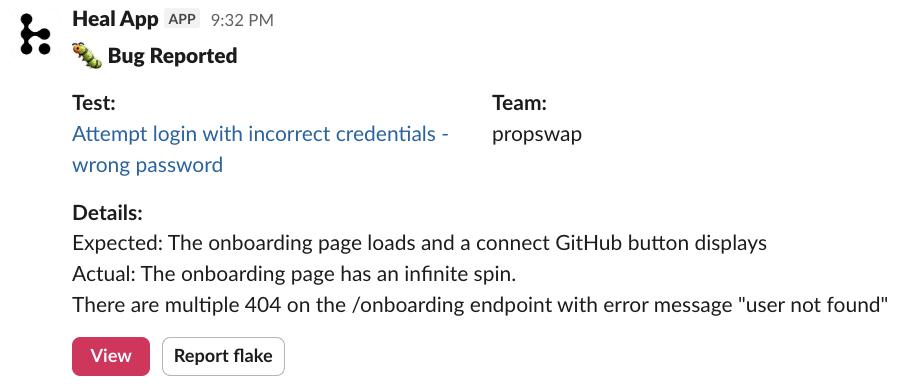
When a bug is flagged, Heal doesn't expect anything. You can focus on fixing it in your app.
That said, if Heal reports a Bug that you think is irrelevant, you can give feedback by leaving a thumbs down (or using the Report flake button in the slack app)
Action needed: Fix the bug!
UI Changed
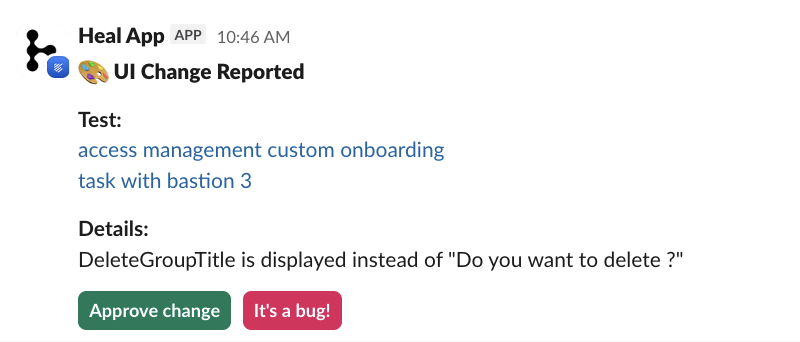
When Heal detects a change in the UI, it will pause the test and ask for your input. You can either
- Tell Heal that the UI change is expected, which will automatically update the test
- Tell Heal that this is a bug, which will update the verdict to Bug.
Action needed: Tell Heal if the change is expected.
Unstable Locator and Broken Test Logic
When an unstable locator or a broken test is detected, you don't need to do anything. Heal will improve the test on its own, and learn from its mistakes. You can still see the verdict in the UI for traceability.
Action needed: None.
Feedback
You can submit feedback on any verdict using a thumbs-up or thumbs-down. In the slack app, you can also use the Report flake button.
Over time, Heal learns from your preferences and gets smarter at sorting out bugs from noise.